 User Guide
Data directory
Data directory contains:
document.db- databaseconfig.ini- instance level settings like port on which the Trilium application runsbackup- contains automatically backup of documentslog- contains application log files
Location of the data directory#
Easy way how to find out which data directory Trilium uses is to look at the "About Trilium Notes" dialog (from "Menu" in upper left corner):
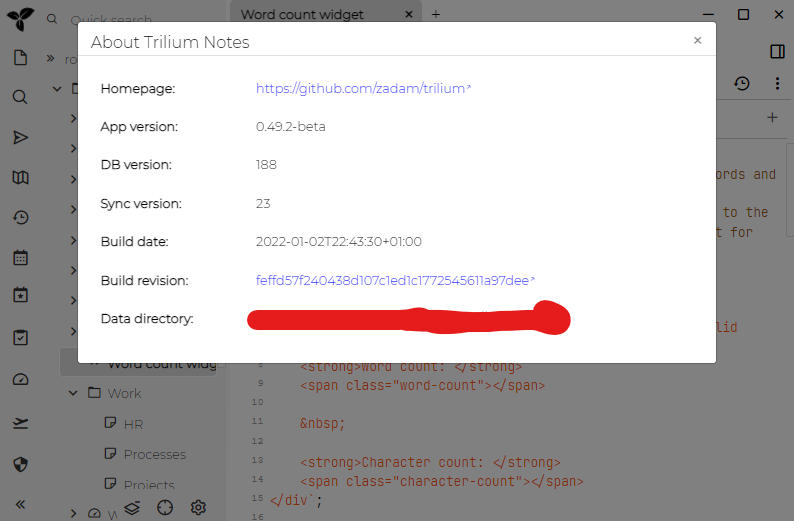
Here's how the location is decided:
Data directory is normally named trilium-data and it is stored in:
/home/[user]/.local/sharefor Linux/home/[user]/.var/app/org.triliumnotes.Trilium/datafor the Flathub version on LinuxC:\Users\[user]\AppData\Roamingfor Windows Vista and up/Users/[user]/Library/Application Supportfor Mac OS- user's home is a fallback if some of the paths above don't exist
- user's home is also a default setup for [[docker|Docker server installation]]
If you want to back up your Trilium data, just backup this single directory - it contains everything you need.
Changing the location of data directory#
If you want to use some other location for the data directory than the default one, you may change it via TRILIUM_DATA_DIR environment variable to some other location:
Windows#
- Press the Windows key on your keyboard.
- Search and select “Edit the system variables”.
- Press the “Environment Variables…” button in the bottom-right of the newly opened screen.
- On the top section ("User variables for [user]"), press the “New…” button.
- In the Variable name field insert
TRILIUM_DATA_DIR. - Press the Browse Directory… button and select the new directory where to store the database.
- Close all the windows by pressing the OK button for each of them.
Linux#
export TRILIUM_DATA_DIR=/home/myuser/data/my-trilium-dataMac OS X#
You need to create a .plist file under ~/Library/LaunchAgents to load it properly each login.
To load it manually, you need to use launchctl setenv TRILIUM_DATA_DIR <yourpath>
Here is a pre-defined template, where you just need to add your path to:
        Label
        set.trilium.env
        RunAtLoad

        ProgramArguments

            launchctl
            setenv
            TRILIUM_DATA_DIR
            /Users/YourUserName/Library/Application Support/trilium-data
Create a script to run with specific data directory#
An alternative to globally setting environment variable is to run only the Trilium Notes with this environment variable. This then allows for different setup styles like two database instances or "portable" installation.
To do this in Unix-based systems simply run trilium like this:
TRILIUM_DATA_DIR=/home/myuser/data/my-trilium-data triliumYou can then save the above command as a shell script on your path for convenience.
Electron user data directory (desktop only)#
When running the desktop application, Electron stores internal data (caches, spell-check dictionaries, session storage, etc.) separately from the Trilium data directory. By default this goes to the system's application data folder (e.g. %APPDATA% on Windows), which may be undesirable in corporate environments with roaming profiles or when running in portable mode.
To keep Electron data out of the system's roaming profile, set the TRILIUM_ELECTRON_DATA_DIR environment variable to an explicit path. The trilium-portable script does this automatically, pointing it to trilium-electron-data/ next to the application.
Fine-grained directory/path location#
Apart from the data directory, some of the subdirectories of it can be moved elsewhere by changing an environment variable:
| Environment variable | Default value | Description |
|---|---|---|
TRILIUM_DOCUMENT_PATH | ${TRILIUM_DATA_DIR}/document.db | Path to the Database (storing all notes and metadata). |
TRILIUM_BACKUP_DIR | ${TRILIUM_DATA_DIR}/backup | Directory where automated Backup databases are stored. |
TRILIUM_LOG_DIR | ${TRILIUM_DATA_DIR}/log | Directory where daily Backend (server) logs are stored. |
TRILIUM_TMP_DIR | ${TRILIUM_DATA_DIR}/tmp | Directory where temporary files are stored (for example when opening in an external app). |
TRILIUM_ANONYMIZED_DB_DIR | ${TRILIUM_DATA_DIR}/anonymized-db | Directory where a Anonymized Database is stored. |
TRILIUM_CONFIG_INI_PATH | ${TRILIUM_DATA_DIR}/config.ini | Path to Configuration (config.ini or environment variables) file. |
TRILIUM_ELECTRON_DATA_DIR | System appData | Directory for Electron internal data (caches, spell-check dictionaries, etc.). Set this in portable mode to avoid writing to the system profile (desktop only). |